Know what will post before it posts
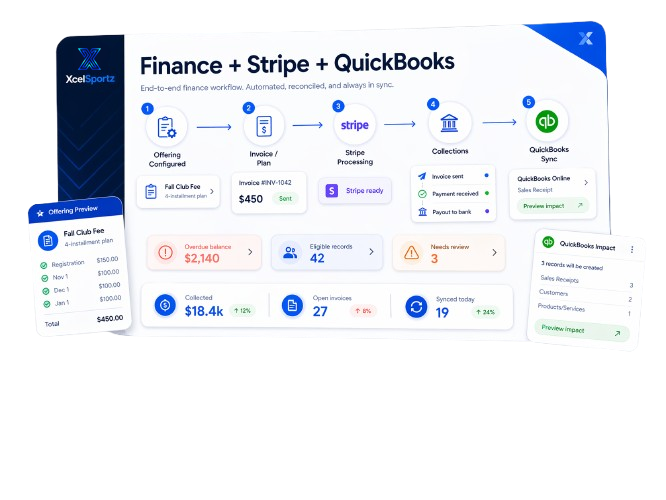
Preview counts, cutover rules, and mapping blockers before you move a single record into QuickBooks.
Features
Move billing and payment activity into QuickBooks with a flow that feels understandable, reviewable, and steady. Connect once, set your accounting rules, preview what will move, and keep finance work on a reliable rhythm.
Why it matters
Preview counts, cutover rules, and mapping blockers before you move a single record into QuickBooks.
Run syncs on demand or on a schedule so finance work does not get stuck behind spreadsheet handoffs.
Choose income and deposit accounts, decide how refunds behave, and keep the rules visible for your team.
What moves
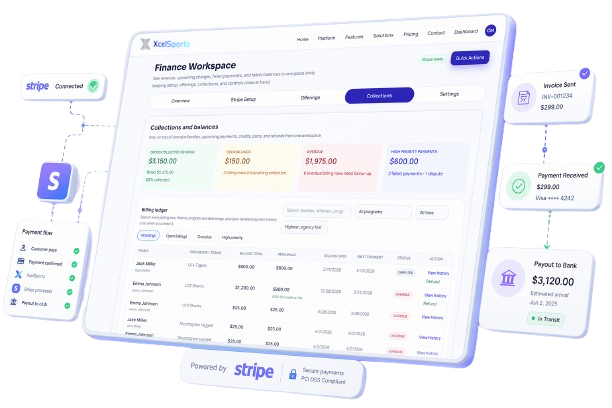
Keep the accounting side clear without flattening your operations into generic exports. XcelSportz supports a reviewable QuickBooks Online flow around the records that matter most for billing and reconciliation.
How it works
Sign in once, bind the right company, and keep the connection at the organization level.
Set your income account, refund handling, deposit account, customer naming, and cutover date.
See what is ready, what is blocked, and what will stay out of scope before anything moves downstream.
Run it now or schedule it, then review run history and exceptions in one place.
Your operational workflow stays in XcelSportz. QuickBooks stays the accounting destination.
Run summaries, record states, and accounting status exports make it easier to close the loop each month.
Org-scoped access, audit history, and role checks help keep finance data in the right hands.
Retry a run, retry a single item, or mark an exception handled when something needs human judgment.
FAQ
XcelSportz helps reduce manual bookkeeping work. Your accounting team still owns final accounting decisions.

Keep finance moving
When billing context, sync rules, and run history all live in one place, month-end gets calmer fast.